Inspiration
Get inspired by our sellers’ success stories and discover how Shopee Ads can work for you too.
To help sellers scale efficiently and improve campaign performance, we're introducing "Rapid Boost" which is a smart tool for accelerating growth and optimizing results.
Rapid Boost is an algorithm-driven tool for GMV Max Custom ROAS campaigns. Once enabled, it automatically boosts traffic and explores ROAS up to 30% below the seller's target, helping break through the learning phase and capitalize on high-traffic periods to gain more sales.
1. Enter Shopee Ads: From the Shopee seller center homepage, navigate to the Marketing Center and select Shopee Ads.

2. Enter Promote My Products: Click on "Create New Ads" and select "Promote My Product".

3. Choose GMV Max Custom ROAS: On the Ads Creation Page, select your target products and set the bidding method to GMV Max Custom ROAS. Rapid Boost is available on both single product and Ad Group.

4. Enable Rapid Boost: Scroll down to find the “Rapid Boost” column. Toggle the switches to enable Rapid Boost for your chosen products.


1. Recommendation Card

2. Ads List Banner

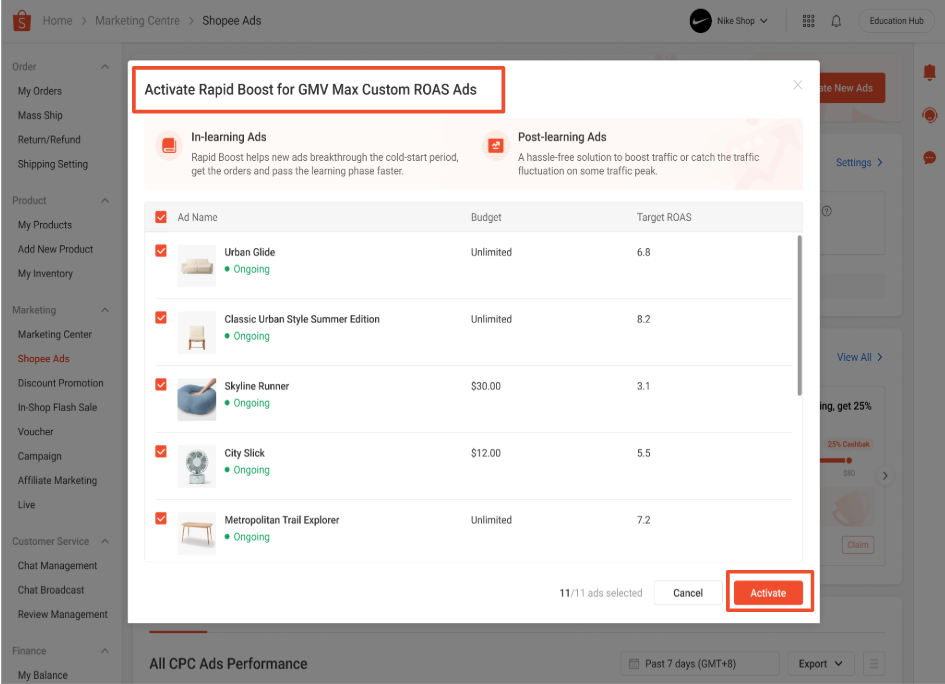
3. Ad Detail Page
Method 1: Check in the Ads List

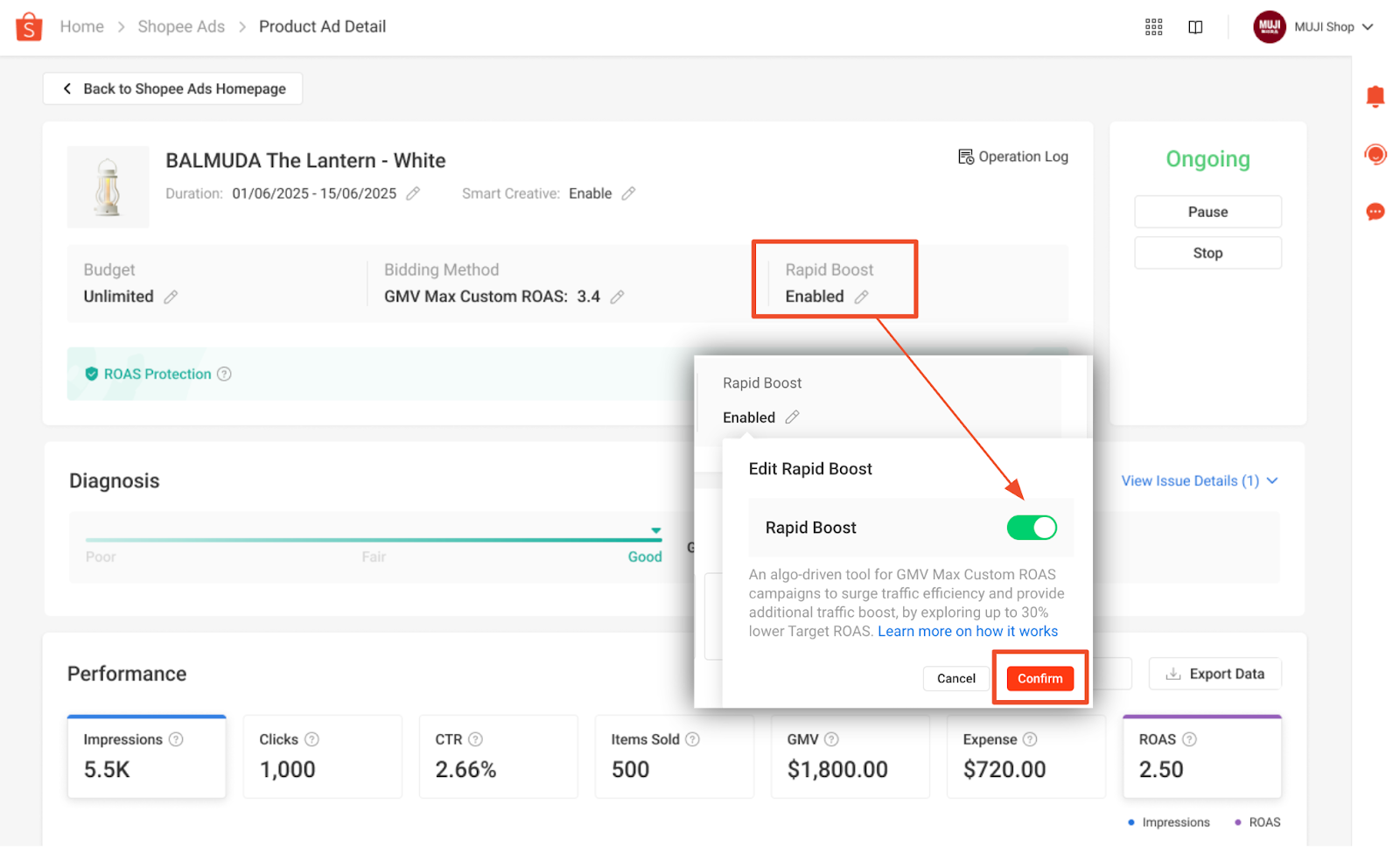
Method 2: Check on the Ad Detail Page
What happens to the ROAS Protection eligible amount calculation when a seller enables Rapid Boost?
Can a seller use Rapid Boost and Campaign Surge features simultaneously?
What are the differences between using Rapid Boost and manually lowering the target ROAS?
Compared to manual adjustments, Rapid Boost has two key advantages:
Last Updated: December 29, 2025
First Published: July 9, 2025
Was this page helpful?
 Yes
Yes No
NoTo help sellers scale efficiently and improve campaign performance, we're introducing "Rapid Boost" which is a smart tool for accelerating growth and optimizing results.
Rapid Boost is an algorithm-driven tool for GMV Max Custom ROAS campaigns. Once enabled, it automatically boosts traffic and explores ROAS up to 30% below the seller's target, helping break through the learning phase and capitalize on high-traffic periods to gain more sales.
1. Enter Shopee Ads: From the Shopee seller center homepage, navigate to the Marketing Center and select Shopee Ads.
2. Enter Promote My Products: Click on "Create New Ads" and select "Promote My Product".
3. Choose GMV Max Custom ROAS: On the Ads Creation Page, select your target products and set the bidding method to GMV Max Custom ROAS. Rapid Boost is available on both single product and Ad Group.
4. Enable Rapid Boost: Scroll down to find the “Rapid Boost” column. Toggle the switches to enable Rapid Boost for your chosen products.
1. Recommendation Card
2. Ads List Banner
3. Ad Detail Page
Method 1: Check in the Ads List
Method 2: Check on the Ad Detail Page
What happens to the ROAS Protection eligible amount calculation when a seller enables Rapid Boost?
Can a seller use Rapid Boost and Campaign Surge features simultaneously?
What are the differences between using Rapid Boost and manually lowering the target ROAS?
Compared to manual adjustments, Rapid Boost has two key advantages:
Last Updated: December 29, 2025
First Published: July 9, 2025
Was this page helpful?
Yes NoFeedback
Feedback